Khóa DeepSeek API miễn phí có tín dụng: trình tạo DeepSeek V4, DeepSeek R1, DeepSeek Coder cho Windows
DeepSeek API Key Generator bắt hai truy vấn: trình tạo khóa cho DeepSeek V4, DeepSeek R1, DeepSeek Coder và khóa DeepSeek API miễn phí có số dư không thẻ. Cửa sổ: Service «DeepSeek API», Generate, nhật ký API Checker, Copy, DEEPSEEK_API_KEY.
DeepSeek API Key Generator làm gì
Đây là phân tích hàng DeepSeek API trong cửa sổ Moggyday AI API Key Generator. Mô hình: DeepSeek V4, DeepSeek R1, DeepSeek Coder. Khi Generate chưa xong, Key trống. Chương trình không hỏi thẻ: bộ kiểm tra sao chép khe còn hạn ngạch.
Tìm trình tạo khóa cho DeepSeek V4, DeepSeek R1, DeepSeek Coder: bot Telegram, n8n, Continue/Cursor, LangChain, Python SDK, sinh viên không thẻ, SillyTavern. Cụm thứ hai — khóa DeepSeek API miễn phí có số dư, không thẻ.
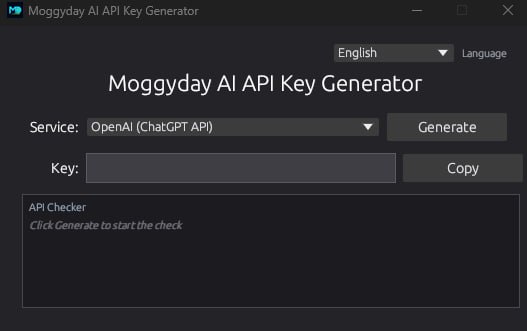
Trang này phủ những truy vấn nào
Công thức: deepseek v4 free api, DeepSeek API, free DeepSeek API, deepseek r1, OpenAI API tương thích. Cụm thứ nhất trình tạo cho DeepSeek V4, DeepSeek R1, DeepSeek Coder. Thứ hai khóa miễn phí có số dư, không thẻ.
- deepseek v4 free api
- DeepSeek API
- free DeepSeek API
- deepseek r1
- OpenAI API tương thích
- khóa có số dư
- không thẻ
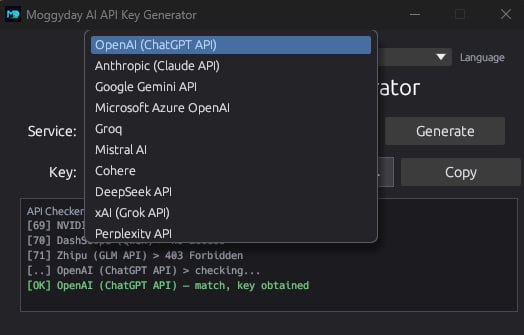
Cách đọc nhật ký API Checker
Generate chạy hết danh sách. skip và 403 là hàng lạ. Hàng của bạn: [OK] DeepSeek API — match, key obtained. Service phải đúng DeepSeek API. Sau [OK] sao chép khóa vào DeepSeek SDK, DEEPSEEK_API_KEY, OpenAI-compatible base URL và đặt DEEPSEEK_API_KEY. Các mục danh sách bên cạnh không cần trên thẻ này.
Khóa sẵn dán vào DeepSeek SDK, DEEPSEEK_API_KEY, OpenAI-compatible base URL. Biến DEEPSEEK_API_KEY. Key trống nghĩa là lượt còn chạy hoặc mục sai.
![Nhật ký API Checker DeepSeek API Key Generator: skip, 403, chờ [OK] DeepSeek API](/blog/ai-keygen/log.jpg)
Cài đặt và hướng dẫn từng bước
Tải kho lưu trữ từ thẻ chương trình dưới bài này. Giải nén vào đường dẫn không chữ Kirin. Chạy exe. Bật internet khi kiểm tra.
- Service → DeepSeek API
- Generate, đừng đóng khi số trung gian
- [OK] match, key obtained → Copy
- Dán: DeepSeek SDK, DEEPSEEK_API_KEY, OpenAI-compatible base URL / DEEPSEEK_API_KEY
- Windows 10/11 x64, khoảng 14 MB